See Films Differently Momo Notices
Why Can I Hear the Explosions but Not the Dialogue?
How to compare dialogue, loud effects, playback settings and the room using conditional checks from device manuals, with a His Girl Friday detour.

Start with the soundtrack, the playback route and the room. Dialogue enhancement and quieter peaks do different jobs; neither is a universal fix.
You turn the volume up for a sentence, then down for a crash. The remote is becoming a supporting character.
A loud explosion doesn’t tell you why the words are difficult to follow. The difference between quiet and loud passages may be too large for the level you can comfortably use. A voice may be competing with other sounds. Your playback settings may need checking against the equipment you actually have. Noise and reflections in the room add another set of conditions.
I’d begin with a short passage you can replay, rather than a shopping list. Keep the same film, audio track and playback route while comparing one change at a time. Write down the original setting so you can return to it.
First, identify which problem you have
There are two useful distinctions. Is the voice too quiet, or audible but hard to understand? And are the troublesome effects happening after the line, or over it?
A quiet sentence followed by a very loud crash raises a question about the gap between levels. A sentence competing with music at the same moment raises a question about the balance of sounds. Making the whole soundtrack louder can raise the competing sounds as well.
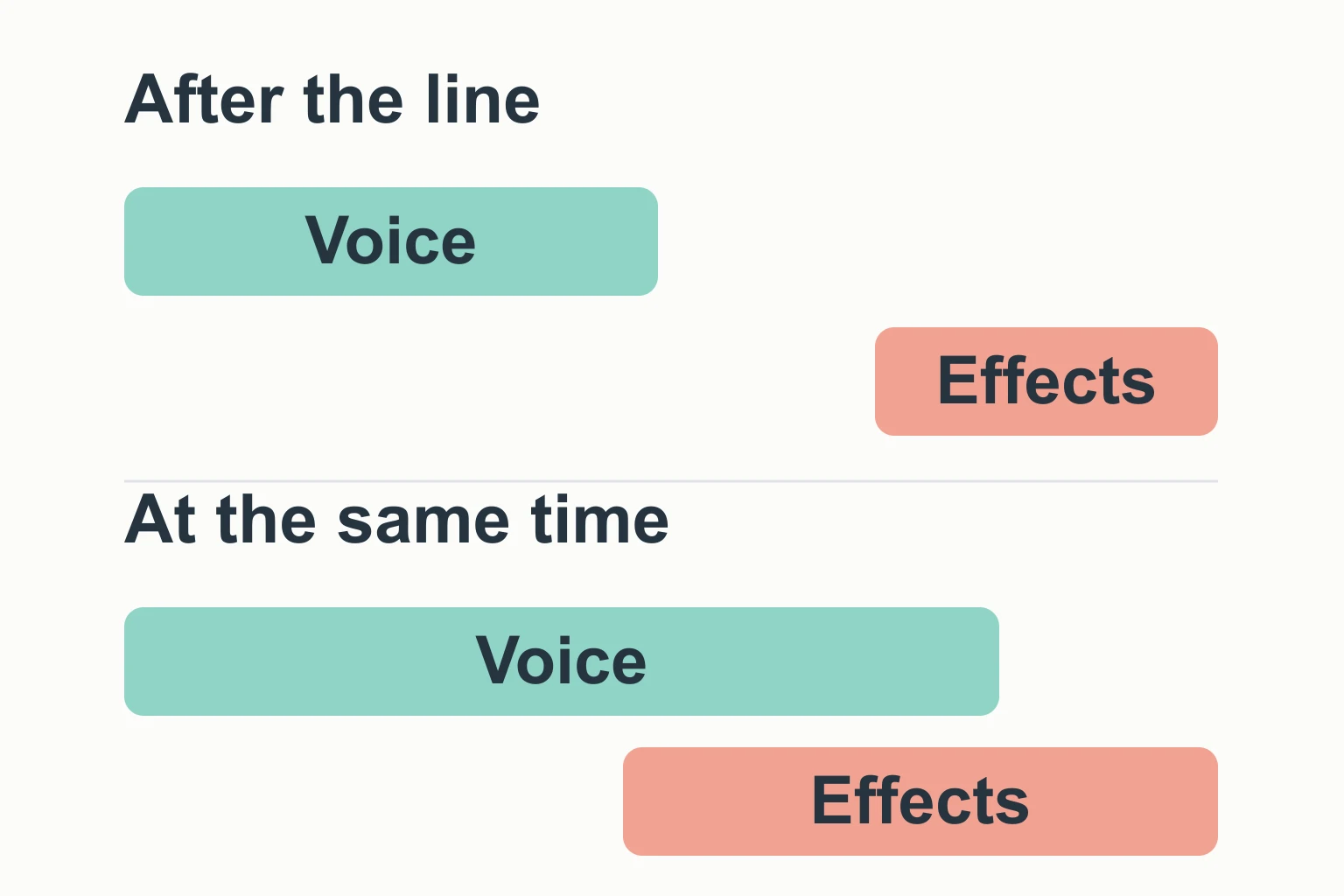
Your first comparison needn’t settle the cause. It should make the next thing to check more specific.
| What to check | A useful comparison | What it can tell you |
|---|---|---|
| Film and audio track | Confirm the selected language and track; try another familiar programme through the same route. | Whether the difficulty appears confined to particular material. That alone doesn’t prove a bad mix. |
| Playback route | Identify whether sound comes from TV speakers, a soundbar, a receiver or headphones; check the relevant manual. | Which device’s settings and supported formats apply. |
| Available processing | Compare one supported dialogue or dynamic-range option with its original setting. | Whether that particular control makes this passage more comfortable or easier to follow. |
| Room | Replay with competing household sound reduced, if convenient, or compare another seat. | Whether the listening conditions make a noticeable difference. |
These are informal listening comparisons, not measurements of your equipment. Replaying a line also makes it more familiar, so don’t treat recognising it on the third attempt as proof that a setting has repaired the sound.
The mix and your volume control
The mix is the arrangement and balance of the soundtrack’s voices, music and effects. Playback adds its own stage: decoding the selected track, routing it to the speakers and applying any processing you’ve chosen.
Dolby’s explanation of 5.1 sound describes different channels serving different purposes, including front-channel dialogue and a separate low-frequency-effects channel. That describes this surround format. It doesn’t mean every spoken word in every film occupies a channel you can independently turn up.
A stereo or mono soundtrack needs a different account. Even with surround equipment, the selected track, the incoming signal and the listening mode matter. Check those before borrowing somebody else’s centre-speaker advice.
Quieter peaks and stronger dialogue are different controls
Dynamic range is the difference between loud and soft sounds. Dynamic-range compression reduces that difference. Here, “compression” concerns levels, rather than making an audio file smaller.
On Apple TV 4K, Apple describes Reduce Loud Sounds as reducing dynamic range, while Enhance Dialogue makes dialogue more prominent. These are separate options. Availability depends on the model, the material playing and the speakers or headphones being used.
For a quiet-line/loud-crash problem, an available dynamic-range control is worth comparing. If your concern is a voice’s prominence, a dialogue control is a different comparison. Neither description promises that you’ll catch every word.
The names need checking, too. The Denon AVR-X3900H manual lists Dynamic Compression for compatible incoming signals. Its separate Dialog Control requires a compatible DTS:X signal. A menu label is no guarantee that the function can operate on tonight’s track.
On the Denon AVC-X4800H, Dialog Enhancer instead adjusts the centre-channel frequency band. Its manual says the setting is stored for each source and unavailable in Direct or Pure Direct mode. Similar-looking dialogue labels can describe different operations and restrictions.
I’d compare the gentler available option first, then decide whether the difference suits this viewing. Stronger processing has a trade-off: Apple explicitly says Enhance More may alter the original mix. An evening when you need lower peaks can warrant a different choice from one when you can give the soundtrack more room.
Output format deserves the same care. Apple’s guide reserves Stereo Only for a stereo setup. It isn’t a setting I’d prescribe to every reader with missing words. Match the configuration to the actual equipment, using its instructions.
The room hasn’t left the conversation
Sound from the speakers reaches you alongside sound already in the room, and reflections from its surfaces.

In its primer on equalisation, Shure distinguishes adjustments to frequency balance from acoustic problems involving reverberation, reflections and background noise. The guide concerns sound reinforcement; it gives us a useful reason to keep the room separate from the menu, rather than a measured diagnosis of your living room.
Before trying another setting, notice what else is audible where you sit. A conversation nearby, for instance, competes for your attention as well as adding sound. A quieter comparison may tell you more than another leap in volume. Changing seats is another possible comparison; its result belongs to your room and speaker arrangement.
You can also compare headphones you already own, if convenient, at a comfortable level. That changes several things at once—the playback device, the route and the room’s contribution—so an improvement is a clue, not proof that the TV speakers are at fault.
An old comedy won’t promise slower words
For a rather lively reminder that dialogue itself has demands, consider Howard Hawks’s His Girl Friday (1940). This black-and-white comedy follows reporter Hildy Johnson and Walter Burns, her editor and ex-husband, who wants to keep her on a story and in his life. Criterion’s identified edition has a monaural soundtrack.
In Farran Smith Nehme’s essay, Hildy and Walter interrupt and mimic each other; the dialogue’s speed and rhythm are central to the comedy. I like that as a reason to distinguish getting a voice loud enough from keeping up with what it’s doing. A menu cannot make their verbal competition leisurely while preserving its pace.
Old doesn’t mean slow. If the lines are audible and you want help catching them, subtitles are a perfectly reasonable choice. I’d rather follow the exchange than keep auditioning volume settings for the role of interpreter.
Keep a change if it helps this viewing; restore it if it doesn’t. If the problem persists and you contact the equipment’s support service, your model, audio track, playback route and list of comparisons will be more useful than “the sound is bad”. Meanwhile, you can put the subtitles on and let the film continue.

References & further reading
- Apple, ‘Change audio settings on Apple TV 4K’, Apple TV User Guide. Dialogue enhancement, Reduce Loud Sounds, output formats and availability conditions. Checked 2 October 2026.
- Denon, ‘Surround Parameter’, AVR-X3900H Online Manual. Dynamic Compression and Dialog Control; these depend on compatible incoming signals.
- Denon, ‘Adjusting the audibility of dialog and vocals (Dialog Enhancer)’, AVC-X4800H Online Manual. Centre-channel frequency-band adjustment and mode/source restrictions.
- Dolby Laboratories, ‘Dolby Digital 5.1’. Channel functions and playback/decode overview. Product-specific explanation, not an independent guarantee of clarity.
- Davida Rochman, ‘EQ I.Q.: A Quick Primer’, Shure, 26 November 2012. The scope and limits of equalisation in sound reinforcement.
- The Criterion Collection, His Girl Friday. Premise, black-and-white format and identified edition’s monaural soundtrack. Edition information checked 2 October 2026.
- Farran Smith Nehme, ‘His Girl Friday: The Perfect Remarriage’, The Criterion Collection, 9 January 2017; originally included in its 2017 edition. Descriptions of interruption and dialogue rhythm. The essay contains plot spoilers beyond the material used here.
The listening comparisons are Momo’s suggestions based on the distinctions above. No hardware test, room measurement or viewing of the cited edition was performed for this article.
For the next unexpected question, follow the Journal in your RSS reader.
On screen
Films discussed
- His Girl Friday (1940) · Howard Hawks
Further reading
Read next in the Journal


Want a recommendation shaped around your evening? Ask Momo what to watch next →